

Source code
- Hosted
- Never
- Local
- Yes, on the runner
Plug and Play Reviewer
Built for solo devs shipping 2 to 3 pull requests a day
A hosted control plane takes GitHub events. Your local runner reads the diff and calls your model. The patch never leaves the machine you trust.
That boundary is not a promise on a slide. CI runs a schema check that fails if source, diffs, or provider keys could land on the hosted plane. See what we store in Privacy.
An open source PR reviewer built for private AI code review. It is AI code review self hosted on a laptop or a server you run.
Self-hosting the control plane needs a GitHub App before you click either button below. Read Self-host the control plane first.
See how a review movesmain
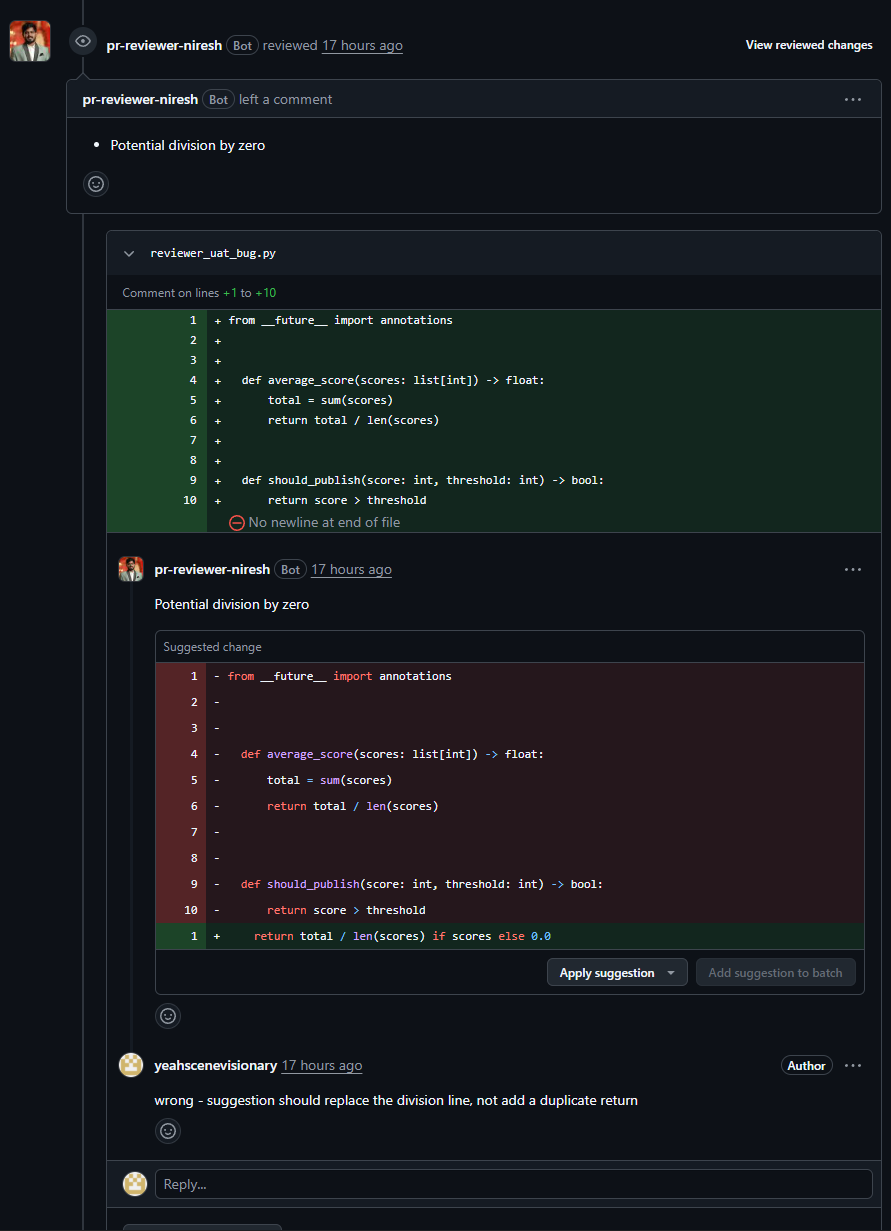
found 1 high
Not a mockup. This is the App commenting on a pull request in one of our own repositories, after a human approved the finding.
Read the last line too. The finding is right, the suggested patch is not, and the author says so. That is the whole reason a person approves every comment before it posts, and the reason the scorecard reports what we measured instead of a number we like.
GitHub PR to hosted job to local runner to retrieval to review comment. The hosted box never holds the patch.
The GitHub App receives the pull request event and the head SHA.
The control plane stores job metadata only. It does not receive the diff.
Your runner claims the job, fetches the patch, and keeps the source local.
Repo chunks join the packed diff before the model call.
A comment does not post until a human approves it.
Source, diffs, and your provider API key stay on the runner. Finding text may sit on the dashboard so you can read it before you approve a post.
Grounded findings, suggestion blocks, and the human gate are product rules, not slogans.
The model call happens on your laptop or server. Source never goes to the hosted site. The hosted plane only ever learns that a job ran, which repository it was for, and what it cost.
The reviewer gets repo chunks with the packed diff. It is not a diff-only guess.
A finding that cannot point at the packed hunk is dropped before anyone sees it.
An optional suggested_fix can post as a GitHub suggestion when the replacement applies.
Security, correctness, tests and docs reviewers run only when a repo turns them on, under agent-prompts in the terminal UI. Off by default, because each one is another model call.
The model cannot mark a finding public. Posting stays a human action.
You can add agents and edit prompts per repository. Those settings stay private to that repo.
Repo A never receives Repo B prompts. This is permissioned team power, not a public dump.
Access shape
A single person running a local reviewer can stay on a simple path. On the free tier a repository has one owner at a time: connect as many as your GitHub App installation covers, and nobody else can pair against one you already hold.
Team controls, shared prompts, and more than one person on the same repository are the paid path. There are no prices on this page.
Every finding is scored by a second model call and anything ungrounded is dropped before you see it. The scorecard shows the measured result on a human-judged holdout, with the model and the sample it was run on. That holdout is seven human-judged cases from the Zod repository, so it is evidence, not a published baseline.
Open the scorecardGitHub App
Install the GitHub App and pick the repositories it may read.
Hosted URL
Point the runner at the hosted URL. plugandplayreviewer.online is the live control plane.
Local runner
Install the runner on the machine that may see your source.
Your LLM provider API key
The key from OpenAI, Anthropic, Groq or whoever you use. It stays on the runner and never reaches the hosted database.
Step 02 is the only part you can hand to a host. These deploy the control plane, not the runner: the runner must stay on a machine you trust, which is the whole point.
Self-hosting the control plane still needs your own secrets and database. Railway starts from a repo import until a public template id exists.
Read the install docs